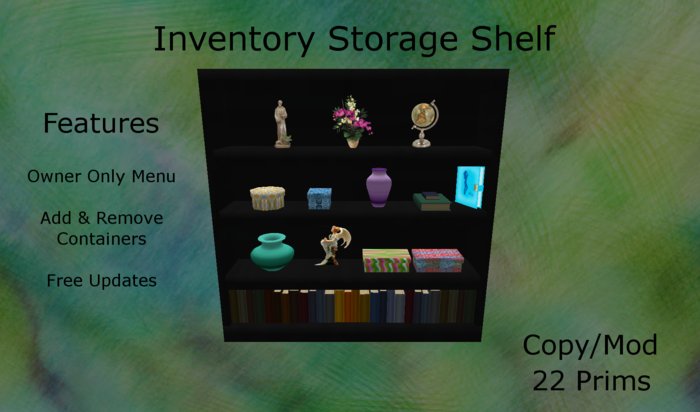
The Inventory Storage Shelf is amazing. Not only this a great looking furnture item for your home but its mainly an organizer and a great way to help you lower Inventory counts, maybe even enough to help lower your load time, and who doesnt want less lag! Try putting all your out of season Stuff in here, finding what you want much faster and with less lag to enjoy your SL world even better.
Features - Owner only storage menu
Add and Remove containers
Free updates
Copy/Mod
22 Prims total
Mostly Sculpted
Comes with instructions on how to use.
Ideas - box containers and books can be used for anything. Accessories, jewelry, hats
shoes, boots, sandals, furniture, etc.
Diary can be used for love notes etc.
For example, if you have full outfits just make a cube box with your build tools and drip the entire outfit in that box and name the box with a short name of the outfit. Limit number of letters is 24. Then put that single box into the inventory Shelf with one simple short name to know for the entire outfit. Tada! your now organized!
Here how the shelf works.
1st make a extra copy of the shelf in your inventory as a backup.
Now rez your shelf and place where you want it.
2nd you will see all kinds of nice things on the shelf for you to put any kind of things in them. On how to do that, there is 2 ways.
1 you can hold down the control key on your keyboard, wile dragging and dropping items to a prim, like one of the boxes on the shelf. This will drop the item into the container.
Other option is to right click edit the shelf and in edit window check edit linked, then just left click any of the containers and then go into the content tab of your edit window and then begin to drag drop your items from your inventory to the contents.
tip also you can re name and name any of the containers for your storage. I had named some for you in there to get started. In edit link parts you can name the containers in your edit window.
3rd Once you have added your stuff to the shelf, then edit the shelf and go to build at the top of your sl game screen and click on script or reset scripts to reset the scripts into the closet so it will read in the menu all your items you have recently put into it.
4th Now your done. To receive your items back or to view whats in the containers. Just left mouse click on each container to get a menu pop up. This will list the short part of the item names you have put into the container you clicked on. There is a letter limit. Also when you click the word of an item in your menu, this will send the item back to you to click keep/show to go back into your inventory.
5th Impotent notes
all items on the shelf is copy mod so you may add or remove parts you don't need or need to add. To do so just edit link parts and unlink
what you want to make a copy of or to remove. Be sure you don't have
any items inside the ones you do this to except the script. If your adding more boxes or so, then just edit link them to the other containers and
may need to reset scripts when finished if you don't get a menu.
Its also best to put copy items into this shelf but you can put no copy items in it at your own risk. Best to use copy and have it backed up in your inventory in case of sl gliches and item dispearing.
Any thing in your sl inventory can go into this shelf.
I'm not responsible for lost items. It be due to sl. So as I say its best to not put your most expencive no copy items into this shelf.
For any questions or problems please feel free to IM me or send me a note card. As some times IM get caped and I don't received them.
Made by Ainowena Dreamscape
- Owner only storage menu
- Add and Remove containers
- Free updates


