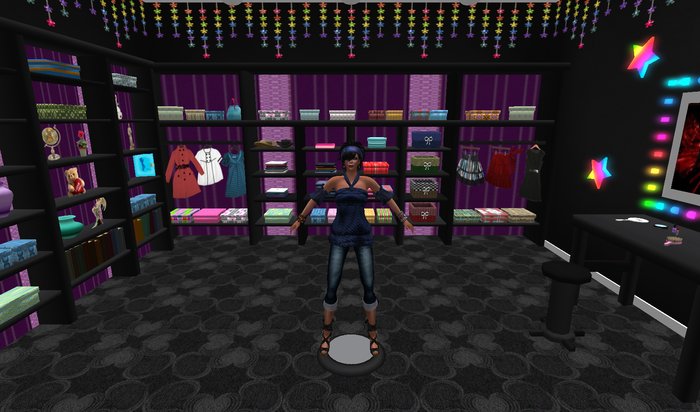





The Inventory Storage Walk In Closet is amazing. Not only is this a great looking furnture item for your home but its mainly an organizer and a great way to help you lower Inventory counts, maybe even enough to help lower your load time, and who doesnt want less lag! Try putting all your out of season clothes in here, finding what you want much faster and with less lag to enjoy your SL world even better.
Features
wall paper inside closet and carpet, click for menu texture change
animated rainbow stars & lights
Chair with menu poses
Owner Only Menu
Add & Remove Containers
Free Updates
Copy/Mod
163 Prims total
Size without ext 8x8m / with ext 6x8m
Mostly Sculpted
Comes with instructions on how to use.
Can remove front extension. Was made for sky box.
Ideas - handbag used for purses, bags.
folded clothes used for shirts, jeans, shorts.
box containers can be used for anything else. Accessories, jewelry, hats
shoes, boots, sandals, etc.
Diary can be used for love notes etc.
For example, if you have full outfits just make a cube box with your build tools and drip the entire outfit in that box and name the box with a short name of the outfit. Limit number of letters is 24. Then put that single box into the inventory closet with one simple short name to know for the entire outfit. Tada! your now organized!
Here how the closet works.
1st make a extra copy of the closet in your inventory as a backup.
Now rez your closet and place where you want it. The closet
doors are not linked to the main part of the closet, so be sure to make sure you have all parts in edit before you move it. If it gets apart just move it back together.
2nd left click the doors to open and also if you click them again they will close. If they are left open, they will auto close in 300 seconds.
3rd you will see all kinds of nice things in side for you to put any kind of things in them. On how to do that, there is 2 ways.
1 you can hold down the control key on your keyboard, wile dragging and dropping items to a prim, like one of the boxes in the closet or hanging clothing and handbag, This will drop the item into the container.
Other option is to right click edit the main part of the closet and in edit window check edit linked, then just left click any of the containers and then go into the content tab of your edit window and then begin to drag drop your items from your inventory to the contents.
tip also you can re name and name any of the containers for your storage. I had named some for you in there to get started. In edit link parts you can name the containers in your edit window.
4th Once you have added your stuff to the closet, then edit the main part of the closet not the door and go to build at the top of your sl game screen and click on script or reset scripts to reset the scripts into the closet so it will read in the menu all your items you have recently put into it.
5th Now your done. To receive your items back or to view whats in the containers. just open your closet doors and left mouse click on each container to get a menu pop up. This will list the short part of the item names you have put into the container you clicked on. There is a letter limit. Also when you click the word of an item in your menu, this will send the item back to you to click keep/show to go back into your inventory.
6th Impotent notes
all items inside the closet is copy mod so you may add or remove parts you don't need or need to add. To do so just edit link parts and unlink
what you want to make a copy of or to remove. Be sure you don't have
any items inside the ones you do this to except the script. If your adding more boxes or so, then just edit link them to the other containers and
may need to reset scripts when finished if you don't get a menu.
Its also best to put copy items into this closet but you can put no copy items in it at your own risk. Best to use copy and have it backed up in your inventory in case of sl gliches and item dispearing.
Any thing in your sl inventory can go into this closet.
I'm not responsible for lost items. It be due to sl. So as I say its best to not put your most expencive no copy items into this closet.
For any questions or problems please feel free to IM me or send me a note card. As some times IM get caped and I don't received them.
Made by Ainowena Dreamscape
- wall paper inside closet and carpet, click for menu texture change
- Owner only storage menu
- Add and Remove containers
- animated rainbow stars & lights
- Chair with menu poses


Love It!
this made the perfect closet addition to my home, with a small amount of deco skills this made the greatest and unexpected surprise for my inventory items/usage for many backdrops.. and a wonderful neat little place to hang out for any fashionista! this will also look great on its own, theres really no reason not to get it, look at the colors ^^
Love it!
Absolutely LOVE IT! Just what I was looking for. Does exactly what is says it does and is so easy to operate. What makes this even better was the customer service. Creator came and assisted me with linking the lights (yes there are working lights included). Thank you so much for creating a great product and for your awesome customer service. Highly recommended!


