

--------------------------------------------------------------
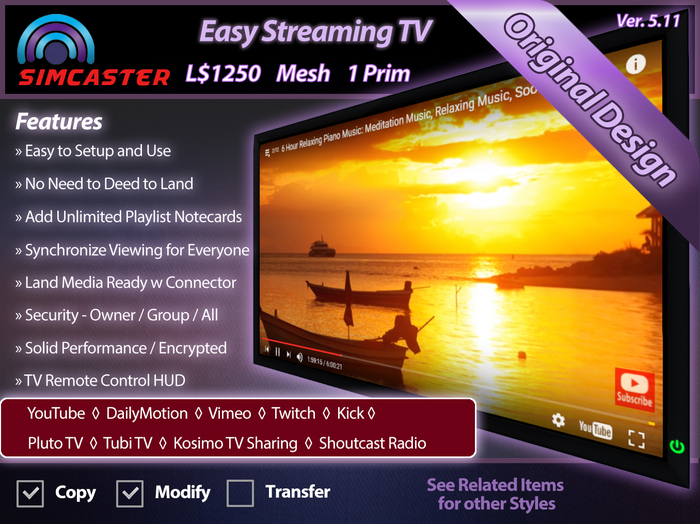
Easy Streaming TV (Rev. 5.1) - YouTube / DailyMotion / Vimeo / Twitch / More
--------------------------------------------------------------
*** HiVid TV Alternative ***
*** Please try the demo first ***
The Easy Streaming TV now supports many new streaming services!
YouTube
Vimeo
Twitch
Daily Motion
Shoutcast (1000's of stations)
Pluto TV
Tubi TV
Kosmi TV Sharing
Kick Streaming Service
MP4 videos hosted on a website
The Easy Streaming TV is a simple, configurable TV that gives you fast and easy access to Streaming videos and playlists. No need to buy an expensive TV bogged down with tons of features and links you will never use. This TV will work on any land without having to enter cumbersome media properties. You will never have to deed this TV to your land to make it work. The TV displays its videos on the full screen through a rock solid encrypted server to make viewing of high quality videos safe and easy. Videos can be synchronized for all TV watchers. No questionable or copyrighted materials are in this TV.
Two TVs in the Box:
-----------------
This product comes with two versions of the TV. One version has the stand attached, and the other one is for wall mounting, without the TV stand. Rez the appropriate TV and resize it to fit your needs. Also included in the box is a default example playlist, which you can use as a template to add your own playlist notecards to the TV. The TV comes with a simple TV Remote HUD which attaches to the lower right of your screen. Many more features are included with this TV. See the Help Kiosk at the SimCaster store inside SecondLife.
How to Use:
----------
To turn the TV on, click anywhere on the TV frame. The power light will change to green. When the TV menu comes up, you can enter your Streaming URL, select a Streaming URL from the default playlist, use the YouTube web interface, or even call up a standard web browser. You can also set TV to Auto Play, Loop or change any of the options. URLs can be for a single Streaming video or a mixed Streaming playlist.
View videos in different different ways:
1. Enter a YouTube URL directly. Just copy the YouTube URL from your favorite browser and paste it into the pop-up box.
2. Notecard Playlist. Drop a playlist notecard on the TV with a list of videos. Then select your video from the "Playlist" menu.
3. Standard YouTube web interface.
Add up to 9 playlist notecards to the TV. Each playlist notecard can contain up to 50 videos. You can use the menu to switch between any of the playlists added to the TV.
Land Media Ready with Connector:
-------------------------------
The Easy YouTube TV uses Prim Based Media which makes the setup and use of the TV very easy. There are times where you will want more out of this TV than the Easy YouTube TV can offer. With the purchase of the optional LAND MEDIA CONNECTOR, you can supercharge this TV and transform it into a more robust LAND MEDIA TV. The TV is then played using your Parcel Media settings. Performance features include:
* The Land Media TV will allow you to watch a video seamlessly anywhere on your parcel.
* You can rez as many TVs as you want and let them all play the same picture at the same time without any distortion.
* A Land Media based TV makes for perfect synchronized viewing of videos when more than one person is present.
Helpful Hints:
-------------
You can choose "play all" from the playlist, and have the TV play all the videos on the notecard playlist. YouTube videos from the playlist are sent to the YouTube API and presented as a YouTube native playlist.
Synchronized viewing: Two or more people can enjoy loading videos and watching the TV together. This is a great way to share an intimate time together with a friend or partner, or to operate the TV as a movie screen. First, load the proper video. Once everyone has their TV activated (i.e. they see the paused video screen), click on Auto Play in the menu. The video will start to play for everyone.
If any problems arise, use the refresh button (circular arrow) from the mini-browser menu at the top of the TV. Also try using the home button on the mini-browser. If all else fails, reset the TV from the options menu. These options will fix almost anything.
To hear the sound from your video anywhere on the parcel, you can go to the Sound & Media settings and change the "Starts getting quieter" to 512 and "Completely disappears at" to 512 in your viewer preferences.
Other Options:
-------------
* Color changing on most TV Styles
* Set the TV to zoom in on the screen when clicked.
* You can rez a TV Remote HUD which operates the TV from a distance.
* You can set the access to OWNER, GROUP or ALL.
SimCaster LLC.
See item in Second Life- Easy to Setup and Use
- Plays YouTube and Vimeo Videos and Playlists
- Use up to 9 Playlist Notecards
- Synchronized Viewing / Encrypted Server
- Security - Owner / Group / All


I can't get it to work
The instructions are simple, but it does not work. I Have tried several options. I get to the point where the tv says, "touch here to start your video" and nothing happens. I just got this to replace my Easy You Tube Tv from the same vender. Neither TV works. It's really odd, because for a while, it was my best TV. My land has good frame rates and usually very little lag
TV Television Streaming
OMG Best TV, forever grateful to Laura talking me through it every step of the way and got back to be within a few hours with 5* customer service, im not generally great with technology, she made it easy to understand and had huge patience. Totally 5 star deserved and i highly recommend.
Media TV Television Streaming
Thanks simcaster, always great items and great customer service, always my "go to" store for all my media needs. Never lets me down and always reliable. Great product yet again Mike.
Media TV Television Streaming Version 5.11
Fantastic TV, everything i needed it to be, and plus brilliant customer service. Never been let down by this Seller and management. Thank you for creating great quality items! Thanks Laura simcaster for all your help to set it up to my requirements. hugs
not as advertised
does not sync any better than sharing a link; and getting everyone ready... 1, 2, 3 play. some hud options to get to web sites (if you unable to find them yourself). buy the $1L or free one for same results....


