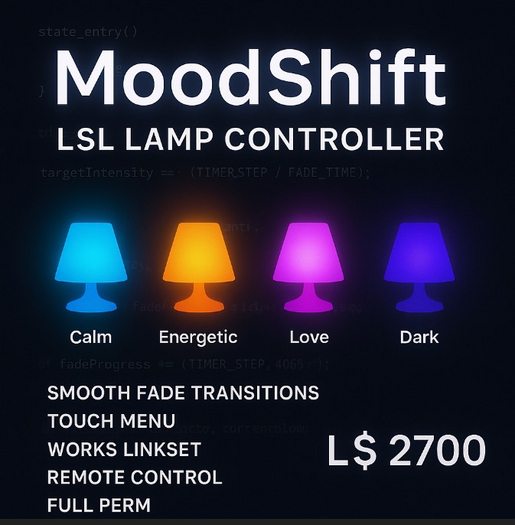

If you want a lighting system in Second Life that actually feels alive, here’s the thing: most “color change” scripts flip instantly from one shade to another. It works, sure, but it doesn’t feel good. This script fixes that. The MoodShift LSL Lamp Controller gives your lights the kind of subtle fading and soft transitions that make a room feel intentional instead of rushed.
This is a full-perm, creator-friendly script built for lamps, decor pieces, wall lights, sculptures—anything you want to turn into a mood-driven lighting fixture. Users can touch the object and pick a mood from a simple menu, and the lamp will glide gently toward the new color, glow level, and intensity. No laggy animation tricks. No clunky resetting. Just smooth math doing clean work.
Let’s break it down.
The script starts by listening on channel 42. That means you—or another controller—can talk to it remotely. A linked HUD, a room controller, or even another lamp can send commands like “Calm” or “Energetic,” and every lamp listening will respond at the same time. Creators who build sets, clubs, themed rooms, or roleplay environments will appreciate that kind of easy sync.
But the main experience is dead simple. Touch the lamp, pick a preset, and watch it shift.
You get four moods out of the box:
Calm — A cool, soft blue tone that brings down the energy in a room. Perfect for bedrooms, relaxation areas, meditation spaces, or spa environments.
Energetic — A warm, radiant glow that pulls attention immediately. Bright, amber, inviting—great for clubs, bars, dance floors, or stages.
Love — A rich pink-magenta mix that makes your space feel intimate and warm. Works beautifully for homes, romance spots, or themed venues.
Dark — A deep purple with minimal intensity, giving you that low-light, mysterious vibe.
Each mood isn’t just a color. It comes with its own glow value and light intensity. That means you can shape the atmosphere precisely the way you want it—calm doesn’t just mean “blue,” it means “soft.”
The fade system is where the script really stands out. Instead of snapping instantly from one look to another, everything fades over one second by default. You can speed it up, slow it down, or make the transitions almost imperceptible by tweaking just two numbers: FADE_TIME and TIMER_STEP. Even creators with basic LSL knowledge can adjust the timing to fit their style.
And let’s talk about installation, because nobody wants to wrestle with a complicated setup.
Drop the script into the root prim. That’s it. The script automatically updates the entire linkset using PRIM_LINK_SET, so every light-capable surface in the object will shift together. Glow, light color, intensity, and surface tint update instantly and smoothly. Even mesh objects behave nicely, as long as the faces support emissive or light settings.
You get full permissions, so you can:
– use it in your own products
– modify it
– rename it
– expand the presets
– package it into your own lamps
– sell it inside your store
– include it in furniture, environments, or HUD systems
There’s nothing locked down, nothing restricted, and nothing hidden behind a no-mod setup. If you want to break it open and turn it into a full lighting engine for your brand, go for it.
This script also works great inside clubs and venues. You can create multiple lamps around your building, then trigger all of them using chat commands. Hit “Energetic” and the whole room wakes up. Hit “Calm” and everything cools off instantly. It’s simple, fast, and doesn’t require complex link messaging or rezzer setups.
The fade math ensures your lights never flicker or jump. It takes your current values—color, glow, and intensity—and slides gently toward the new ones. This creates a natural feel that’s visually pleasing and friendly for photography, roleplay, ambience, and immersive builds.
You can also add more moods. Want a sunset orange? Easy. Want an icy cold white? Add it. Want crazy neon animations? That’s just a loop away. The script is clean, readable, and structured so creators can expand without rewriting the whole thing.
One of the best parts is the user experience. People just touch the object and pick a mood. No configuration menus, no long instructions, no weird extra steps. Most buyers prefer simplicity over complication, and this script keeps the workflow smooth for both creators and end-users.
In short, this is a utility script that makes your products feel refined. Whether you're designing for retail, club environments, romantic scenes, fantasy builds, sci-fi lighting, photography sets, or RP houses, this mood lamp engine adds polish to everything it touches.
If you want your lighting to feel soft, responsive, and alive—and you want to give your customers something that feels premium—this script is an easy win.
Full perm. Simple to use. Clean results.
Drop it in, touch the lamp, choose the mood, and the rest happens on its own.
- Smooth color, glow, and intensity fade transitions
- Touch menu with four built-in moods
- Works across entire linkset instantly
- Remote control via chat channel 42
- Full perm for creators and resale


