
PDA Guitar Pro HUD
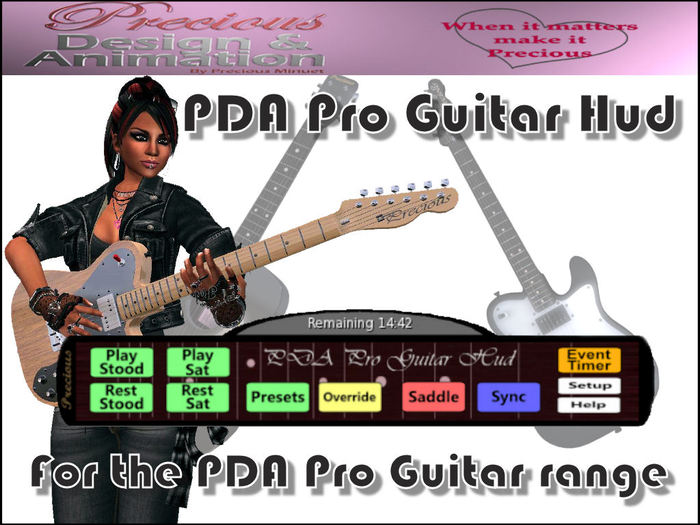
This HUD is designed to make the use of the PDA range of Pro Guitars even easier to use (no more chasing the guitar with your mouse in order to activate it's menu)
** Please note: This HUD will only work with V2.0 of the PDA Pro Guitars or later. If you have an older version (it will say to you in local when you attach it which version you have) you should automatically receive an update from the update server.
In order to use the HUD just wear it and your PDA guitar (the order you wear them doesn't matter - they will 'connect' anyway). The HUD attaches to the bottom centre of the screen although changing this should present no problems but remember that if you wish to use the built in Event Timer you will need to leave a little room at the top for the timer to pop open.
When the HUD and guitar connect the buttons will enable on the HUD (if they should remain greyed out just detach and re-attach either the guitar or HUD).
Most of the buttons work the guitar in exactly the same way as the equivalent menu option on the guitar menu. I've listed them here again for completeness;
[Play Stood] - Positions the guitar into the playing position and begins the playing animation in a standing stance
[Rest Stood] - Positions the guitar into the playing position and plays the relaxed/waiting animation
[Presets] - Your own animations overriden to play the guitar - see below...
[Play Sat] - Positions the guitar into the playing position and begins the playing animation in the sitting stance
[Rest Sat] - Positions the guitar into the playing position and plays the relaxed/waiting animation
[Override) - play guitar over almost any animation - see below...
[Saddle] - Positions the guitar onto your back for easy transportation
[Setup] - As all avatars are of a different shape and size this puts the guitar into setup mode showing a static pose for ease of positioning.
[Sync] - See below
The buttons that are different on the HUD are as follows;
[Sync] - This will restart the animations on any PDA guitar within 20 meters and that have Sync enabled (default setting). If they are playing the same animation everyone will appear to be in perfect sync (on laggy sims this can sometimes not work so well - try the sync button again until everyone is playing together). Only one person needs a HUD in order to synchronise everyone else. All the guitars to be synced must be V2.0 or later.
[EVENT TIMER] - Clicking this will pop up a menu allowing you to set a countdown timer ticking above the hud. Useful for performances so you can see at a glance how long you have left. The digits will turn yellow when the end of the time is getting close and red when almost done. If you should go over time the digits will tell you and start to flash. Clicking Event Timer and then Stop hides the pop-up display again. The timer is designed so that even if you should crash - when you log back in the timer will be at the correct time (in essence it will continue to count even though you are offline). I did the timer this way because, very often, streaming is unaffected by SL crashing and the performance can continue while you log back into SL.
This HUD also has an automatic update system included so when there are updates or new features added you can be sure you'll always have them at no extra cost.
If you have any comments or feature requests please feel free to send me a notecard (My IM's can get capped sometimes).
Enjoy
Precious Minuet
Precious Design & Animation (PDA)
- Even easier to use your guitar
- Event timer function
- Synchronise function
- Automatic Updates


Simply the Best of its Kind
This review has been a long time coming because I've used this HUD as well as the Lightwood guitar for years. For one thing, the smoothest, most realistic guitar animations available are to be found in this set. However, the "Override" feature insures that you can keep on playing while using any number of dance animations - by using Override, you'll be doing your fully animated dance moves but the guitar-playing motions remain intact for the upper half of your body making the performing possibilities limitless. I have been asked about my guitar animation so many times that I've finally decided to write a review on these remarkable & affordable products. For those of us doing live shows in Second Life, having something like this which is simple & reliable is so essential. Thanks to Precious for putting so much thought & care into this system - and THANK YOU for the Copy/Mod perms on the guitars - this is what makes the PDA system the most versatile one available. Best Always --Vinnie


