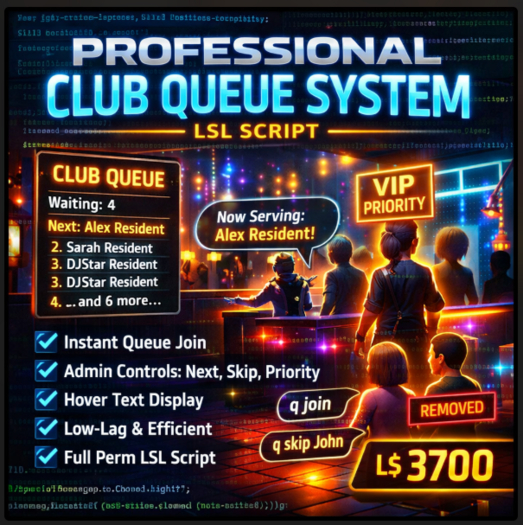

Running a busy club, venue, event space, or live performance in Second Life means one thing: managing people fairly, clearly, and without chaos. When crowds build up, confusion kills the vibe. The Professional Club Queue System v1.0 is built to solve that problem properly.
This is not a gimmick script. It’s a practical, production-ready queue system designed for real clubs, real hosts, and real traffic. Simple for guests to use, powerful for admins to control, and lightweight enough to run all day without lag.
At its core, this system creates a public waitlist that anyone can join using a single chat command. Guests instantly see their position, admins can manage the flow with precision, and everyone stays informed through clean hover text and targeted notifications. No spam. No clutter. No guessing.
Built for real club environments
Many queue systems break down under pressure—too much chat spam, confusing commands, or scripts that lag as the list grows. This script avoids all of that by using efficient list handling, UUID-based tracking, and minimal event usage. The result is a queue that stays responsive even during long sessions or peak traffic hours.
Guests interact using simple, natural commands:
q join
That’s it. No menus, no dialogs, no learning curve. If they’re already in the queue, the script tells them. If the queue is full, it tells them. Everything is handled quietly and professionally.
Admins, meanwhile, get the tools they actually need:
Call the next guest
Skip or remove someone instantly
Move VIPs or performers to the front
Clear the entire queue when needed
All admin actions are immediate, visible, and controlled—no accidental misuse by regular guests.
Clear visual feedback without clutter
The hover text display is designed to be informative without being overwhelming. It shows:
Total number of people waiting
Who is next in line
Up to five visible names to keep text readable
Automatic messaging when the queue is empty
This keeps everyone informed without flooding local chat or relying on constant explanations from staff. Guests can see what’s happening at a glance.
Admin control done right
Admin permissions are handled by legacy name matching and ownership checks. Only authorized users can:
Call the next person
Skip users
Assign priority
Clear the queue
Non-admins attempting admin commands are silently ignored—no public errors, no drama, no exposure of moderation actions. This keeps your venue feeling calm and professional.
The priority system is especially useful for clubs that host performers, VIPs, contest winners, or special guests. One command instantly moves the selected avatar to the front of the queue and notifies them privately.
Designed to prevent common problems
This script actively avoids issues that plague many queue systems:
Duplicate entries are blocked
Queue size is capped to prevent memory overload
Partial name matching makes admin commands fast and forgiving
UUID tracking prevents name glitches
Automatic reset on owner change prevents ghost data
Everything is built with stability in mind. You can rez it, forget about it, and trust it to do its job.
Fully customizable
The script is clean, well-commented, and easy to customize:
Change hover text color
Adjust maximum queue size
Edit admin lists
Modify messages and formatting
Extend functionality if you want to add features later
Whether you’re a beginner learning LSL or an experienced scripter, the structure is easy to follow.
Full permissions. No restrictions.
This product is sold full permission:
Modify
Copy
Transfer
You can use it in personal clubs, commercial venues, events, rentals, or bundle it into your own builds. A clear user guide is included so buyers know exactly how to install and operate the system without support headaches.
Who this is for
Club owners
DJs and hosts
Event managers
Live singers and performers
Venue operators
Anyone running organized sessions in Second Life
If your venue ever has more than one person waiting for attention, this script pays for itself immediately.
- Automatic payment validation with refund handling
- Built-in group discount support
- Safe product delivery with redelivery option
- Owner-only admin controls and easy setup
- Full-permission script with user guide included