![[Px] Unsit and Rotate Add-on Script for AVsitter](https://slm-assets.secondlife.com/assets/38919642/lightbox/second_life_brick_wall_wooden_chair.jpg?1784010890)
This is an add-on script you can use with your AVsitter powered furniture.
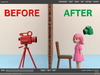
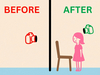
The purpose of this add-on script is to make sure an avatar will be facing towards a specific rotation as soon as they stand up from a furniture after selecting STAND button in the pose menu.
This custom avatar rotation upon standing also avoids situations where the avatar camara is looking at the wall from outside the room if your furniture is close to that wall.
Easy to set up
1. Assign an animation of your choice to a pose named STAND in AVpos notecard. POSE STAND|your_pose
2. Sit on the furniture, play STAND and adjust this pose position and rotation. Click Save and copy from local the values for STAND pose and paste them into Avpos notecard
3. Drop #UnsitRotate script and #UnsitRotateConfig notecard into the furniture
4. Sit on the furniture and select STAND to have your avatar be unsitted and rotated. Adjust standing rotation value in #UnsitRotateConfig notecard until you get the desired avatar rotation upon unsit. Do not use negative numbers.
STAND button can have any other name. Don't forget to update with same button name in #UnsitRotateConfig notecard.
! Viewers prior to 7.2.1.17108480561 will not show your own avatar's rotation being affected by this add-on, but others will see your rotation update.

![[Px] Check Time on Watch Animation + Script](https://slm-assets.secondlife.com/assets/9713201/view_small/Snapshot_001.jpg?1400636960)

![[Px] Play random animations at X interval (On Attach)](https://slm-assets.secondlife.com/assets/21606310/view_small/SCRIPT.jpg?1537160079)

