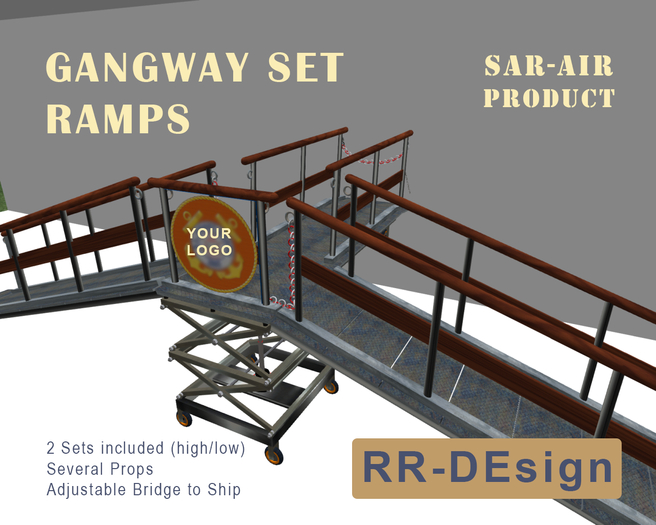

MANUAL GANGWAY BRIDGE TYPE I & TYPE II
====================================
Both Gangway bridges have the same functionality and functions, but the difference is:
TYPE I: Normal quay heights, about 1.00m ~ 1.20m* from the water surface.
TYPE II: Lower quay heights, between about 0,20m ~ 0,50m* from the water surface.
*Overlap between TYPE I and II is handled by bridging the adjustable "to ship" or M(iddle) gangway.
QUICK START
========
A. The 'Elevator Part' in the center rezzes the Gangways, L(eft), R(ight) and M(iddle - towards the ship)
B. Each Gangway part rezzes the chosen accessoiries by touching the wooden railing (Arrow board, open or closed chains, Wet Floor sign)
C. The M(iddle) gangway has the option to set the right altitude to the deck of the ship by touching the Path of the gangway.
SETTING UP THE GANGWAY(S)
=================
Central unit is the 'Elevator' or 'Lift' Unit. From this unit the several gangways are (un)rezzed.
- Touch the Elevator Unit. A pop-up menu shows the different options"
- Gangway-M: Rez M(iddle) gangway from Elevator Unit to the ship's bow,
- Gangway-R: Rez R(ight) gangway (looking towards the ship),
- Gangway-L: Rez L(eft) gangway (looking towards the ship.
The BUTTONS preceded with an X- derez the mentioned gangway. It is optional to rez both L(eft) and R(ight) gangways or just one side-gangway. This will be explained later.
GANGWAY ACCESSORIES
==============
Each separate gangway has the same functionalities, either the M(iddle) gangway can also move to a desired position. Open the gangway menu each separated at a time by touching the surface.
NOTE: To Pop-up this menu from the M(iddle) gangway, touch the wooden railing on top of the gangway!
The pop-up menu will show the next options:
1. Chain H open / close: opens or closes the H(ighest) barricade chain of the gangway*,
2. Chain L open / close: opens or closes the L(owest) barricade chain of the gangway*.
* When a gangway has been rezzed from the Elevator Unit there is no chain rezzed. The open- or closed chain(s) and other accessories are made visible from the gangway menu.
3*. Arrowboard rezzes a barricade at the end of the Elevator Unit Platform that is used when only the L(eft) or (R)ight Gangway has been rezzed. Inside (green) arrow points towards the ship's entrance, while the outside shows a yellow warning arrow for traffic on the quay to avoid collision with the Elevator Unit.
4*. Wet Floor rezzes a 'Wet Floor' sign at the beginning of each gangway, as a gangway may be 'slippery when wet'.
5. Only M(iddle) Gangway! Touch the gangway on the surface to lower the gangway to the desired position towards the ship-deck. This is a rotating action with steps of about 10 degrees.
*BUTTONs preceded with X- derez respectively the 'Arrowboard' or 'Wet Floor' sign. BUTTON [Clean] derezzes all the Accessories.
SET GANG-BOARD LOGO
====================
The Elevator Unit has an option to set a texture logo by UUID. You find the UUID by opening the texture with double-click under the picture. You can even find it by right-clicking the texture in inventory and then select 'Copy the UUID' from the pull-down menu.
You can add the texture by standing next to the Elevator Unit with the chat-command /4 <UUID>
SECURITY-SETTINGS
============
a. For the gangways and elevator unit touch the BUTTON named [OWNER] and thereafter the BUTTON [SECURITY]. Choose from control options ALL, OWNER ONLY or GROUP only.
b. For the M(iddle) gangway right-click the gangway and choose edit from the pie-menu. Activate the 'Content' tab and double-click (or right-click - Open) the script named: ~~ zPUP exemples.
Change the value in line 10: integer ONLY_OWNER_TOUCH= TRUE ; (owner only) or:
integer ONLY_OWNER_TOUCH= FALSE ; (all users)
Save the script and close edit. On default the script is set to owner only. When you like to change this value to all users, you have to set integer ONLY_OWNER_TOUCH= FALSE ; each time a new M-gangway has been rezzed.
For any questions contact Rebecca Rozen.
Voir l'article dans Second Life- Adjustable gangway(s) to any ship or boat
- Chain to open close gangway paths
- Optional Slippery when wet sign
- Height adjustable bridge > ship
- Specially for SAR-AIR FRC and alike


