■ PRODUCT DESCRIPTION
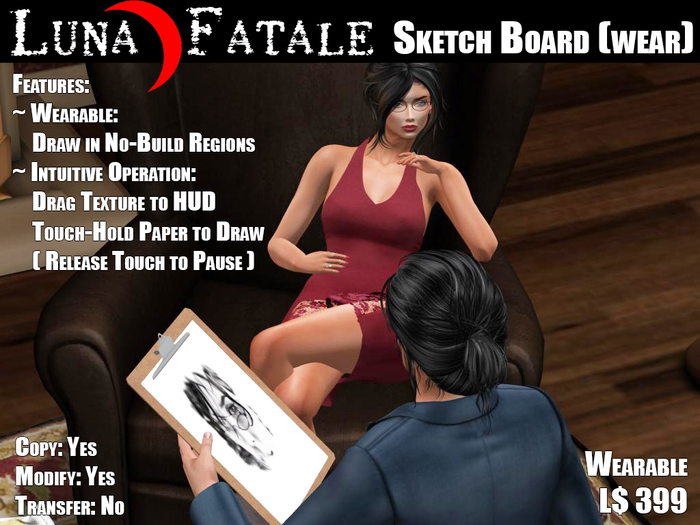
This wearable Sketch Board provides a realistic way to RP and just have fun sketching any scene in ★any★ region, even no-build regions. Just take a Snapshot to Inventory, drag it to the HUD and draw the scene or portrait.
✔ Note: The Silly Dynamics (wearable) Sketch Board was conceptualized, designed and prototyped by Alurcha Niekerk. It is now co-developed and co-marketed by Silly Dynamics and Luna Fatale.
■ OPERATION
To start using your Sketch Board right away:
➀ Attach (wear/add) the Sketch Board.
➁ Touch the Sketch Board or the clip (anywhere except the paper) to acquire the menu.
➂ From the menu get Art Supplies then from the delivered folder attach the Drawing HUD and a pastel or charcoal.
Optionally (wear/add) the Drawing Stool.
➃ Drag the picture you would like to paint from your inventory to the HUD.
➃ Touching the paper and holding will cause you to draw. Drawing will pause when you release your touch.
■ Tips and Tricks
✔ Note: The animation in the stool is designed to be compatible with most AOs. If while seated at (wearing) the stool, you walk to a new position the stool's animation will pause and the stool will disappear during the walk. When you stop walking the stool will reappear and the stool's sit animation will take over.
✔ Hint: To paint another texture just drag it to the HUD. However to re-paint the *same* texture, first touch the face of the HUD and then drag your texture to it again.
✔ Hint: The animations are designed to be compatible with most AOs and furniture. However if standing from furniture (or teleporting, etc.) causes you left arm to relax at your side, just touch the paper momentarily to restore the left hand hold animation.
✔ Tip: To create drawing effects, use the 'Filter' option in the snapshot dialog.
✔ Tip: Get the Silly Dynamics filters here: https://github.com/AlNiekerk/SecondLifePhotoFilter
These filters have been tested with the Second Life official viewer as well as Firestorm. These filters also provide a smooth scalloped edge for a realistic looking sketch. The "charcoal" and "pastel" filters are especially well suited for use with the Sketch Board.
■ SUPPORT
For product support contact:
Primary support contact: Alurcha Niekerk
Secondary support contact: Wendi Nitely
- Wearable: Draw, Paint, Sketch anywhere! Even in "no-build" regions
- Intuitive Operation: Just drag your photo or texture to the HUD to begin drawing
- Seamless long loop animation draws your art progressively as you touch the paper


amazing rp-tool
nothings else to say, just perfect for rp-artists
Awesome RP Tool!
I RP an Artist in Second Life and to date have not had an easy way to have props available. This tool, combined with the ability to grab a quick snapshot and start rendering it on the pad is totally awesome. Yes, I still need to create my final piece of art for any rp I'm in, but for the in the moment aspects of being able to RP and have it show that I am actually creating a sketch, this tool is amazing. I've not seen anything like it. The filters that were provided for Snapshot to get artist like results are also a very nice touch.


