


Features:
Digital speedometer display
Seating offsets
Stunts
Change gears from HUD
Burnout particle effects
Working Suspension
Working handle bars
Working Brakes
Realistic Drifting
Realistic power ratios
Eject button
Passenger animations
Over view: This quad bike has been designed to be an all terrain 4 wheel drive highly precision vehicle giving unbelievable control and performance.
Come and get the FREE DEMO and put it to the test ( You will get a Demo vehicle with the main vehicle Hud this demo is subject to a time limit after such time the vehicle will delete its self. Demo is located at my main store please see the Link below.
Automatic terrain detection
This quad will adjust its self depending on the type of surface you drive on for example
Grass/Dirt: Dirt Dust particles.
Road/Object: Burning rubber particles.
Water: Water particles.
Operation: Attach the HUD sit on the bike click the start button on the HUD. Use the mouse to set your gear.
Highest torque in first gear … Lowest torque in highest gear how it should be.
Main Seating
Once you are seated you can use the seating adjustments on the HUD to move your sitting position to look correct according to your avatar size.
Controls
Controls are simple
W, Forward
A, Backwards / braking
S, Turn/learn left
D, Turn/learn right
E, Pull/lift front of bike
C Push/lift rear of bike
or
Up arrow, Forward
DOWN arrow, Backwards / braking
LEFT arrow, Turn/learn left
RIGHT arrow, Turn/learn right
Page up, Pull/lift front of bike
Page down, Push/lift rear of bike
Double tapping W or UP arrow will put your avatar into the stand up animation
Double tapping S or DOWN arrow will put your avatar into the superflying stunt animation
HUD
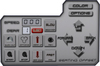
The HUD will show your speed and gear selection
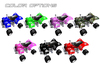
Want to change the color of the bike? No problem i have added 7 different colors to choose from.
Burn out
Click this button to set the monster truck configuration to burn out mode
Eject: got an unwanted passenger? No problem just click the eject button on the HUD and say good bye
Changing gears: Can be done on the on screen HUD.
Options (bottom)
Click this button to set the vehicles mode “Public or privet” meaning you can allow others to drive this vehicle
Options (top)
Drift Init = Drift initiation Allows you to configure the speed at which drifting forces take place.
Drift T Ratio = Drift turning ratio Allows you to set the amount of turn while drifting. These settings will always be remembered by the main vehicle hud and applied once you sit on to the vehicle. The default button will set the default drifting settings.
Color
Will allow you to change the color of the bike
REV
This simply revs the engine :)
Start:
Starts the Engine. Think of this like a key starter. ( This bike does not start simply by sitting on it )
Stop:
Stops the engine. This is so you can sit on the bike with out the engine running.
- Stunts
- Working Suspension
- Eject button
- Passenger animations
- Drifting mode


