
----------------
INCLUDED:
----------------
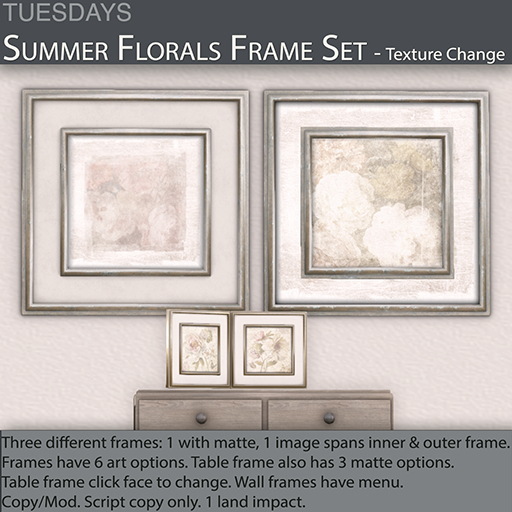
2 Wall Frames
1 Double Tabletop Frame
1 INFO Notecard
----------------
FEATURES:
----------------
2 Versions Walls Frames
1 Version Tabletop Frame
Texture Change
Tintable Shadows
Add Your Photos
Bonus Photos Included
----------------------
DESCRIPTION:
----------------------
Two versions of the wall picture frame are included.
Version 1: has a matte and a smaller photo area.
Version 2: has a larger, full photo area that spans the full frame.
There is a texture change menu accessible by touch. Change the summer floral art photos: 6 of them included, or .to add your own images, go into edit mode and select the center face. Drag your photo to it. Version 2 has a larger photo area that will span the center frame out to the outer frame. Version 1's photo area is contained within the small frame.
The tabletop double frame has no menu. It includes 3 matte options and 6 art options on each side. Just click the face you want to change to scroll through the options.
The back shadow of both is white and tintable. It comes tinted a neutral blackish color but can be tinted to match any surface it sits on. See more about shadows below.
There are built in inner shadows around the photo areas. They are permanent and will add depth to any photos you use giving them a more finished look and feel.
--------------------------
TEXTURES MENU
--------------------------
1. Touch anywhere on the wall frame.
2. Select a floral design.
3. Select Close to close the menu or select Main to go back to the main menu.
1. Touch the matte of the tabletop frame to scroll through the 3 options.
2. Touch either photo area to scroll through the 6 floral options.
------------------------------------
MORE ABOUT SHADOWS:
------------------------------------
For more realism, the shadows are white and tintable. Shadows are not actually black at all, they are a deeper shade of the object they fall upon. If you put an object on a red floor, the object's shadow should be a darker shade of red than the floor itself.
The shadows come tinted a blackish hue to be universal but you can tint them to better reflect whatever surface color you place your object on. This will give you a more realistic shadow effect.
Using the edit window, and selecting the shadow face only using "Select Face", navigate to the "Texture" tab and change the black tint to a deeper, richer shade of the surface beneath it.
If you have any questions or need help, please send me a notecard and I will get back to you as soon as I can.
Thank you and happy SLing,
See item in Second Life


