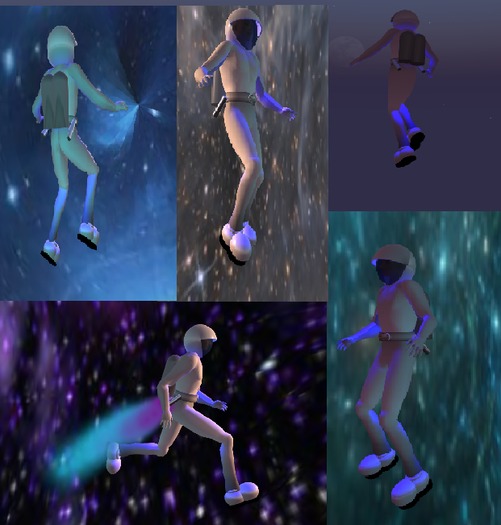


By now you've perhaps realized that we are a bunch of space cadets over here at the Wingsong Dojo - and I say that in the nicest way possible.It's about time we took our fascination with science fiction to the next level!
Yep, you guessed it! The full featured, state of the art, incredible Wingsong AO HUD - Space! Hosting only original and high quality, durable Wingsong animations and a supporting AO system, you are going to LOVE this thing! SERIOUSLY!
Besides, what better way to take off those few extra pounds than a little WEIGHTLESS AO? HAHAHAHAHAHA.
Yeah, right. We should be so lucky....
OK, back to this most excellent AO, though. It is installed with 12 really nice animations (not poses!). Unlike much of our stuff, there's not too much whimsical in this. I do take my science fiction VERY seriously, you know.
Not really. I mean, have you seen our space ship that is fueled by toe jam?
But mostly, this AO is embedded only with the view of realistic space travel. I did throw in one little animation which makes you look like a drama queen when you sit down, but it's an option you can choose, not in the main AO. So you only do the drama thing if you WANT. Otherwise, it's purely serious stuff!
This AO is unisex; both genders fit in it very well.
We did most of our photo op for this AO in our Wingsong Holodeck - Galaxies, available separately at our Marketplace store, and rezzed out for your perusal at the Wingsong Dojo. The pictures of me flying were taken at a friend's space station.
HOW TO USE:
1 - ADD your Wingsong AO HUD - Space. It will automatically position itself near the top center of your screen. Small and nearly transparent, it is very unobtrusive and you can easily reposition and modify it.
1 - Clicking on the Power Switch (the left button of your HUD) makes your AO active; clicking it again disables it. Very handy. The switch turns green when active and fades into near invisibility when disabled.
2 - Clicking on the Wingsong Logo (the bottom right button of your HUD) brings up 10 different animations that are characteristic of what one would find if one were traveling in a low gravity environment such as outer space (including the fun little drama queen animation). These can be accessed whether your AO is turned on or off.
3 - Clicking on the Options Switch (the top right button of your HUD) brings up a menu of options including, among several things, this info sheet and selecting default animations for various key positions as well as a status report. The Options Switch remains green all the time symbolizing our constant ability to choose.
BONUSES
1 - We're including a FREE over the top excellent Wingsong Navigation HUD. This HUD includes a cruise/speed control, compass, speedometer, and altimeter. Open the Wingsong Navigation HUD Box separately. Read the info sheet inside so that you can enjoy the full benefits! It is a full featured, SIMPLE TO USE gadget that, among other things, allows you to set your speed from really slow to really fast and everything in between, and then cruise without having to keep your fingers on the arrow keys. It is compatible with virtually every attachment you have, or even when you're just traveling around on foot. I seldom leave home without my Wingsong Navigation HUD. To use, select ADD from your inventory.
2 - We're also including our shiney new Wingsong Space Suit, which is boxed separately to make it more convenient for you to wear. For best results, remove other clothing and attachments, REZ your space suit out, and select the COPY AND WEAR option. For future convenience, save your suit as an outfit.
A few features of the space suit: There are 2 jet pipes that emit gorgeous stardust particles when you move. You can toggle the stardust on and off by touching the pipes. Touch the right bottom part of your oxygen tank to call up a menu with 3 different looped power sounds. You have three onboard lights which can be turned on and off by touching the back of your helmet, the top of your helmet, and your belt. By default, I have all 3 of them turned on.
And you probably noticed - we did get a little whimsical after all with our Yoshi style space boots. I admit it. I cannot keep a straight face very long!
Everything here is COPY/MOD, so make all the copies you want and recolor, redecorate, resize, retexture, reDO to make it fit YOUR specs! I'm even throwing in a FREE Wingsong Modify Box, a simple, easy to use tutorial for folks with little experience in the EDIT tool.
For questions or a live demonstration of this or any of our fine/fun Wingsong products, IM Kit Ciaco!
We make quite a few AO HUDs available at our Marketplace store; keyword: ao hud.
Second Life の商品を表示


Would be great even if it were more expensive
Though apparently simple compare to expensive AOs in terms of the bare number of animations, it really brings across the space-walk feeling. The scripted jetpack adds to it.
I bought it at 15L$. It definitely outperformans its price.
Useful for a diving suit

I partnered this up with a diving ao, for use with an old fashioned diving suit. Most of them don't expect you to "walk" underwater and use a modified fly, so this fills in the gaps.
Not bad at all.
Easy to use, and the animations are top notch (Especially for a price of L$ 15) Only reason I can't give it 5 stars is it gives you a menu selection to change the walking animation (From the moon-walk bounce default) But then only gives you the same moon-walk bounce animation set. And since there's no way to add your own animations for walking (As per a notecard listing like some other AOs use) and the script is no modify, it would be nice to have more than one "walk" animation built in. Like maybe a kind of floating/Swimming animation without feet on deck like Mermaid AO's use.
Other than that, Phenomenal work!
GAWD, I love it when geeks build!
I can't say enough good about this package - by science fiction buffs FOR science fiction buffs!
Cool effects
i love the fact the airtank has sound like it really would lololol


