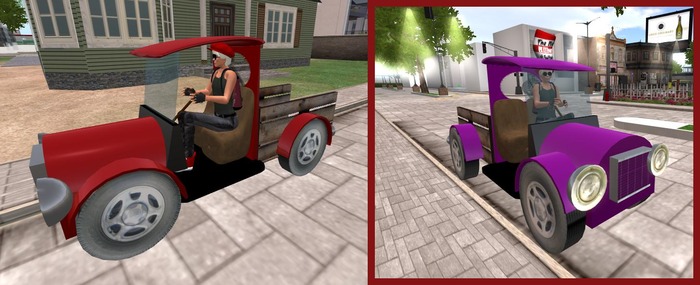

This is a REZ/rideable vehicle. It requires land in order to be REZZED out, and it supports one passenger.
Many REZ vehicles, even those with gears, are souped up to almost unmanageable speeds. We at the Wingsong Dojo prefer to be able to drive our cars on the road without have to constantly fight speed issues. Our cars have been noted by several driving enthusiasts as being among of the easiest vehicles to drive.
This car is part of our Wingsong RIDE LITE series. These vehicles are distinguished from our ACS/KCP based vehicles (which are identified as a RIDE with a version number at the end - example: RIDE V3). The RIDE LITE system has fewer bells and whistles but tend to handle lag more efficiently because they are streamlined.
The Wingsong Pickup Truck RIDE LITE has an excellent 6 gear speed system (between 5 and 70 mps). This is a very easy car to handle, yet gives a decent speed for those who like to have their prim hair blowing in the wind.
In this package you get TWO trucks. Although the trucks are COPY/MOD, for your convenience we're presized a medium and large version.
HOW TO USE AND FEATURES
1 - As the owner of the car you are the only one who gets to drive. To start your car RIGHT CLICK on the car and select Sit Here. Your passengers may right click on it and select Sit Here after you are in the car.
2 - Embedded with original Wingsong animations.
3 - Turn off other Animation Overrides.
4 - REZ your vehicle at a REZ zone or other land that you have REZ perms.
5 - Move using your arrow keys. To stop tap your DOWN ARROW key.
6 - To activate your cruise control press both your RIGHT ARROW and LEFT ARROW keys at the same time. To turn your cruise control back off press them again.
7 - To shift gears up (go faster) press your PAGE UP key. To shift back down press your PAGE DOWN key.
8 - Your wheels turn as you move. They do not move while you are standing still. Your front tire rotates as you turn right or left.
9 - Click on the license plate for a menu of 9 fun vehicle sounds (beeps, horns, etc). You can easily add your own sound files by dragging them from your inventory to the license plate's content tab in the EDIT MENU.
10 - Click on the roof to toggle a faint yellow light on or off.
11 - Although your truck is COPY/MOD, we've installed a convenient onboard colorizer. To change the color of your truck type "/1212 color" in local chat, without the quotes and where "color" is, you know, the actual COLOR you want.
You can select from the following 25 colors:
black, white, grey, light grey, dark red, red, light yellow, yellow, dark yellow, light green, green, dark green, cyan, turquoise, teal, light blue, blue, dark blue, light purple, purple, dark purple, orange, brown, pink, dark pink
SO - if you want to change your truck's color to black type "/1212 black" without the quotation marks. Like this:
/1212 black
And - DONE! You have a black truck!
For questions or a live demonstration of this or any of our fine/fun Wingsong products, IM Kit Ciaco!
Please Note: Don't be misled by the low cost of our items. We can afford to do this because we create excellent items and provide excellent customer service and support.
To see our line of RIDE LITE vehicles at our Marketplace store, keyword: ride lite.
See item in Second Life


