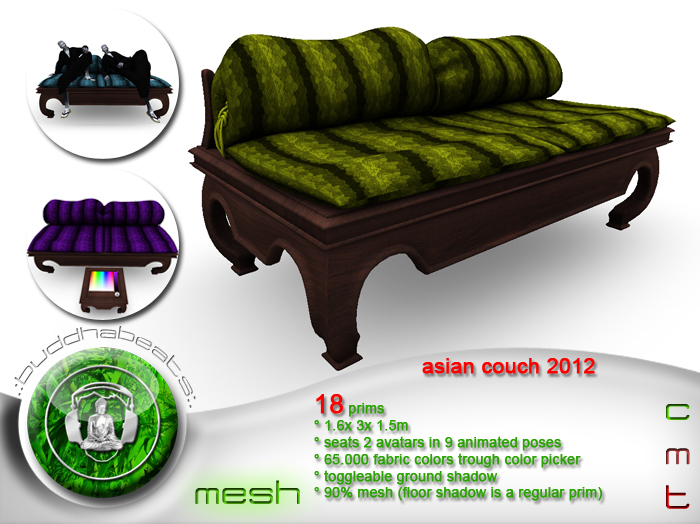


Antique design. Asian style. Avantgarde technology - the Asian Couch 2012.
Even style addicts want to come home after a long day and relax in comfortable pillows. In style, of course!
No matter if you have a modern loft or a japanese stilt house, the asian couch will surely be an eyecatcher.
This couch offers enough space for you and your partner reclining.
Each one can choose from 4 different poses on his or her side of the couch -
and if you like to be alone, theres one special pose for you!
Did i mention the fabric can be set to your favourite color?
Modern technology lets you choose from 65.000 colors - just by two touches.
Simple and intuitive, with a built in touch panel that appears only when needed.
Technology from tommorrow with the style from yesterday.
This couch is also very sustainable - i took care to cause minimal impact on your prim and script ressources.
The touch panel is only rezzed when needed and doesnt even count on your land prim count!
It automatically derezzes after 30 seconds, the asian couch shuts down all listeners and returns to standby.
Loving the good old times - looking forward into the future!
.:buddhabeats:.
FEATURES:
90% mesh (the floor shadow is a regular prim).
18 prims.
copy, no mod, no trans.
ca 3x 1.6x 1.5m sized.
seats 2 avatars (if you want).
9 different animated poses.
smart touch control.
65.000 fabric colors with the easy to use color picker.
toggleable ground shadow - if your pc is strong enough for dynamic shadows.
INSTRUCTIONS:
SITTING:
1. Rightclick the couch and select "sit here" from the pie menu.
CHANGING THE SIT POSE:
1. Rightclick the couch and select "sit here" from the pie menu.
2. Touch the couch while sitting and select your new pose from the pop up menu.
3. Say "/1a" if you want to adjust your positioning
CHANGING THE APPEARANCE:
1. Touch the couch and hold down the mouse button for a while.
2. The couch will "ownersay" a message and rez the control panel in front of it.
3. This can take 3 - 10 seconds, depending on environment lag.
4. Choose your favourite color from the panel and adjust the brightness.
5. Touch the asian couch again to derez the control panel or just wait for the auto delete.
TOGGLE THE FLOOR SHADOW:
1. Touch the couch and hold down the mouse button for a while.
2. The couch will "ownersay" a message and rez the control panel in front of it.
3. This can take 3 - 10 seconds, depending on environment lag.
4. Locate the "shadow button" on the lower right corner of the color picker. Touch it.
5. Touch the asian couch again to derez the control panel or just wait for the auto delete.
If you have any further questions regarding this or other .:buddhabeats:. products, please dont hesitate to IM me.
Namaste,
Roopert Huldschinsky
- 90% mesh (the floor shadow is a regular prim).
- seats 2 avatars (if you want).
- 9 different animated poses.
- 65.000 fabric colors with the easy to use color picker.
- toggleable ground shadow - if your pc is strong enough for dynamic shadows.


