
***OLD ITEM - SCULPTED PRIMS***
You love to be at the beach? You are the tropical heat? Endless summer is your last name?
Time to celebrate the summer like it deserves it!
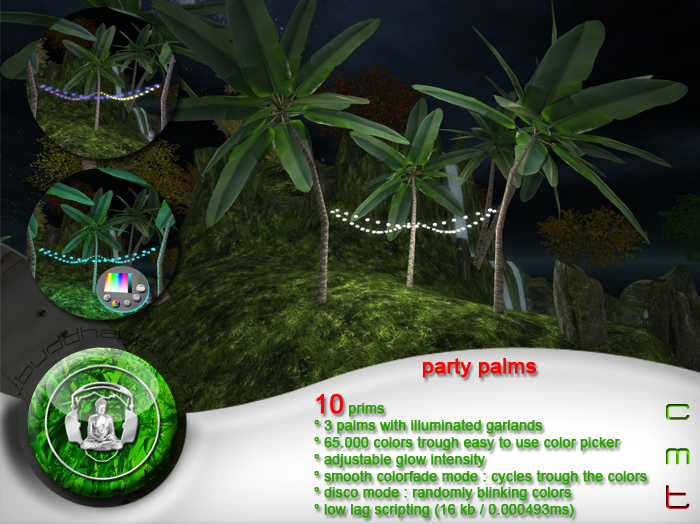
The Party Palms are a funky accesory for your beach partys.
The garlands hanging between the palms can be set to one of 65.000 possible light colors with the
smart and easy to use color picker panel.
Of course theres also a smooth color fade mode for soothing chillout parties.
Since beach parties tend to be quite hot, theres also a new disco mode available.
Each garland lights up randomly in a different color and blinks at 120 bpm - a nice tempo to dance all night long
and very common in disco and dance music.
Of course these palms are friendly to your environment with efficient scripting and low lag!
***FEATURES
10 prims, copy, mod, no trans
scaleable
easy to use smart color picker panel to choose from 65.000 light colors
colorfade mode - cycles smooth trough the colors
disco mode - randomly blinking in different colors (blink rate: 120 bpm)
custom sculpts and high resolution textures
low lag scripting - only one script inside (16 kb / 0.000493ms script time)
***INSTRUCTIONS
BASIC:
touch the palms to toggle the light.
touch and hold the mouse button for 3 seconds to activate the color picker panel.
touch the palms again to remove the color picker panel.
the panel vanishes automatically after 30 seconds.
recolor:
touch and hold the mouse button for 3 seconds to activate the color picker panel.
the color picker panel appears
click the color field to choose a color and use the brightness fader to adjust the brigness.
touch the tree to let the panel vanish or just wait until it auto deletes.
colorfade:
touch and hold the mouse button for 3 seconds to activate the color picker panel.
the color picker panel appears
click the fade button on the color picker panel.
the color picker panle auto deletes itself immediately and the colors start to fade.
disco mode:
touch and hold the mouse button for 3 seconds to activate the color picker panel.
the color picker panel appears
click the disco button on the color picker panel.
the color picker panle auto deletes itself immediately and the colors start to fade.
ADVANCED:
rescale:
rightclick and edit the party palms.
check "stretch" in the upper part of the sl build window.
push or pull the white boxes appearing around the palms until you get the desired size.
panel repositioning:
touch and hold the mouse button for 3 seconds to activate the color picker panel.
the color picker panel appears
edit the panel and move it to a convenient position.
touch the party palms to let the panel vanish or just wait until it auto deletes.
Next time you want to change the color, the panel appears at the stored position.
***NOTE
No trees were harmed for the creation of this virtual object.
Never link any parts to this tree and remove no prims.
This object takes benefit from "windlight glow" - make sure your graphics settings are set to medium or to
enable "basic shaders".
If you have any questions about this or other .:buddhabeats:. products, please dont hesitate to IM me.
Namaste,
Roopert
- easy to use smart color picker panel to choose from 65.000 light colors
- colorfade mode - cycles smooth trough the colors
- disco mode - randomly blinking in different colors (blink rate: 120 bpm)
- custom sculpts and high resolution textures
- low lag scripting - only one script inside (16 kb / 0.000493ms script time)


