-=Proudly brought to you by TM Designs=-
------- ©2012 Tanelorn Manor Designs -------
=======
Features:
=======
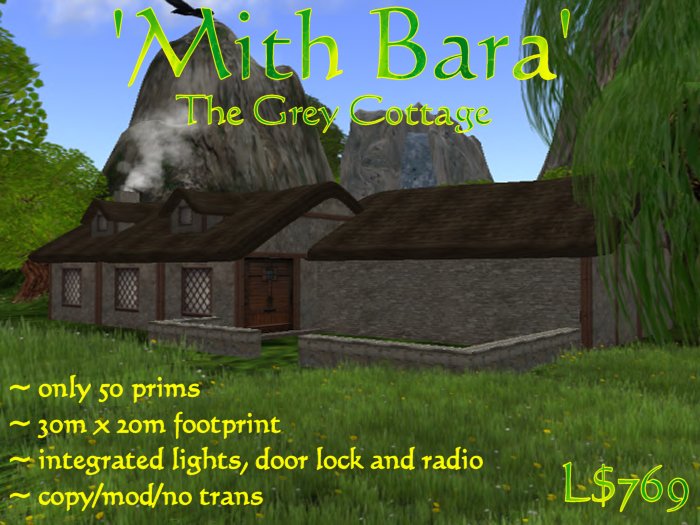
* Original, quality build ideal for Elven, Medieval etc., RP;
* Low prim yet high detail - Only 50 prims !!!;
* Lockable front & rear doors - fully customisable via menu;
* Fully working fireplace with smoke, sparks, flame, light and sounds - fully customisable via menu;
* On/Off realistic smoking chimney;
* Integrated Radio with nearly 100 pre-loaded stations - easily add your own favourite radio streams;
* Rezzable menu controlled light fittings including chandelier in main room;
* Lamps and chandelier can be set to on, off or auto (on during region night and off during daylight);
* Fully integrated TM Control Panel for controlling panel access, doors, chimney, lighting and parcel radio stream;
* Uses Rez Faux rezzing system for reliability;
* Copy/Mod/No Trans (no mod on scripts);
* Recommend 1024 parcel or better - footprint approximately 30m x 20m;
* Free version upgrades for life !!!;
The words "Mith Bara" are Elvish and translated from the Sindarin dialect mean 'Grey Dwelling' and evoke fantastic images from the mythical fantasy lands of those Elven folk.
Much time and effort have been spent in bringing you this quality build and we hope you get many, many hours of pleasure from it.
===================
Personalising Your Cottage:
===================
Mith Bara features the new integrated TM Control Panel. The panel is located just inside the door and appears as a white shield with the "TM" logo on it. From the panel you can customize just about everything via menu controls. Left click the control panel to activate the menu. This is the 'Main Menu' - you will see 9 buttons:
[Door Menu] [Light Menu] [Radio Menu]
[Public] [Group] [Owner]
[Chimney] [Update] [•DONE•]
The top row of options will take you to sub-menus (more on each of these later).
The second row control the TM Control Panel access. Initially panel access is "Owner" only (you !). You can change this to allow access to "Group" - any person in the same group as the one you had active when you rezzed the cottage (whatever tag you were wearing at the time). Changing access to "Public" will allow anyone to use the panel - not recommended.
The bottom row controls:
[Chimney] smoke on/off (toggles);
[Update] checks for the latest version of your cottage and automatically downloads any newer version to the owner;
[•DONE•] closes the menu - we recommend using this instead of the "ignore" button;
NB: current options are shown in brackets () in the text description area above the actual buttons.
ie. on the main menu - "Public/Group/Owner : panel access (Owner);" shows that 'Owner' panel access is currently active.
The integrated radio comes with nearly 100 pre-loaded stations, and it's easy to add your own favourite radio streams;
The fully working fireplace comes complete menu controlled smoke, sparks, flame, light and sounds.
Full, simple-to-follow, instructions are included with the cottage.
Come and see the Mith Bara in world at our Main Store rez area.
Veja o item no Second Life- Original, quality build ideal for Elven, Medieval RP;
- Low prim yet high detail - Only 50 prims !!!;
- Fully integrated Control Panel for controlling panel access, doors, chimney,
- Rezzable menu controlled light fittings including chandelier in main room;
- Uses Rez Faux rezzing system for reliability;


