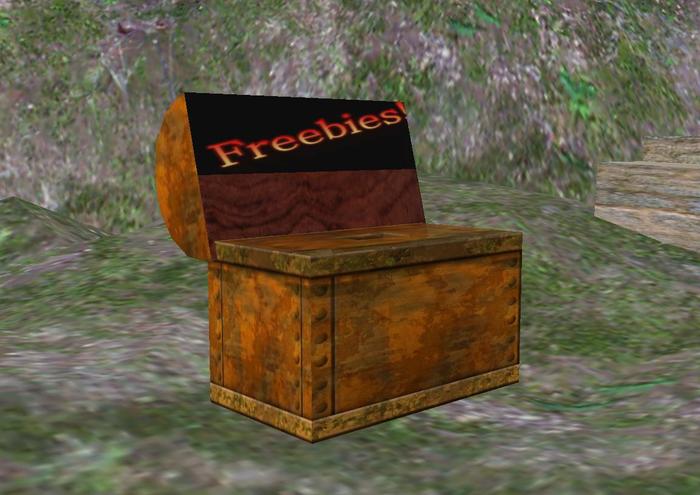
NOTE: While there are over 80 FREEBIES in this chest, it is actually a freebie vendor that YOU can copy and modify to give out your OWN freebies! You can only give items which you have TRANSFER perms.
I give away LOADS of FREEBIES every week. Frankly, my yard was starting to look a little cluttered from all the FREEBIE boxes scattered around the dojo. The neighbors began making rude comments. Even some of the Wingsong critters who live with me began to nag me.
I broke under the pressure.
I gathered the Wingsong Dojo mad scientists and sent them on a noble quest.
They returned from the seven seas with a Wingsong FREEBIE Treasure Chest!
I wanted a low prim way to give away loads of stuff in a manageable fashion. My store-bought vendors didn’t work because they insisted there be an exchange of moolah before they would cough out anything. I didn’t want to package loads of freebies in a single distributing cube that would shoot items into people’s inventory so fast as to knock them over and smash into oblivion. I wanted something with a MENU that would allow folks to click on it and select only the items they wanted.
The Wingsong FREEBIE Treasure Chest is a multi-item distributor of FREE items, a vending machine that gives your guests and customers the ability to choose which of your items they would like. Additionally, you can include different types of objects in the same treasure chest, including objects, landmarks, notecards, and anything else which you have transfer rights to!
FREEBIES are a great way to invite folks to your store or sim, and a wonderful way to say THANKS to customers. Now we have a prim-efficient, attractive, convenient way to give away to our heart’s content!
To use this chest as a vendor, you will have to remove all nontransferable items contained in it (simply delete each item through your EDIT tool) Be sure you have permission to give away anything you place in your chest!
To EDIT your Wingsong FREEBIE Treasure Chest for your own use:
1 - REZ your Wingsong FREEBIE Treasure Chest.
2 - Click on it and select the EDIT tool.
3 - Click on EDIT LINK to temporarily detach the two prims from one another.
4 - Click on the bottom of the chest. You can change the name of your chest in the GENERAL tab after you have successfully selected the bottom prim, which should have a yellow outline showing that it is the parent prim.
5 - Open the CONTENTS tab and you’ll see a script along with several Wingsong items. DO NOT REMOVE THE SCRIPT! Everything else is fair game.
6 - You can delete any item by clicking on the object and selecting “delete.”
7 - To add your own objects, drag them from your inventory into the CONTENTS page next to the SCRIPT. When you close out the EDIT tool the two prims are automatically linked.
It’s just THAT simple!
What’s more, you can COPY as many of these chests as you like and configure them each differently. You can MODIFY them as well (I encourage you to make at least one copy of the original chest before modifying it).
Please note: this is not a selling vendor; you can only place items to be GIVEN away.
Any questions, comments, or to see a live demonstration of any of our fine/fun Wingsong products, IM Kit Ciaco!
See item in Second Life


.
.
Tons of Fun
Kit's Freebies are really creative and fun. Make sure you have some time and/or some fun friends around to enjoy them all! And leaving freebies around can be very generous and made easier with a vendor like this.