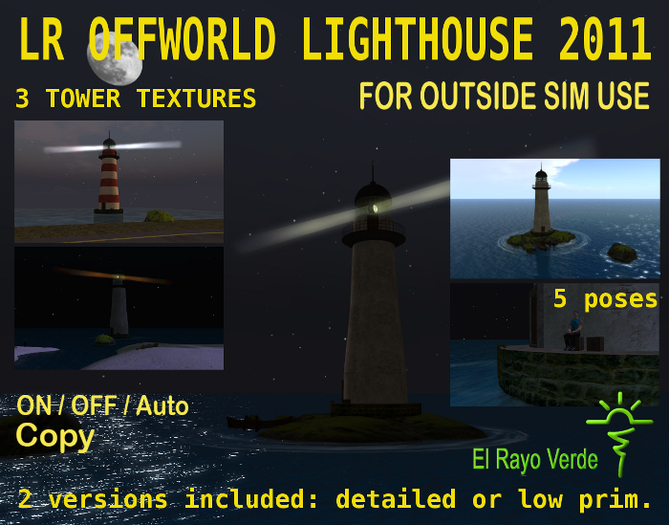

LR OFFWORLD LIGHTHOUSE 2011
With working Lamp menu controlled, can be turned ON/OFF/AUTO and change color, direction and speed of rotation.
Turns on/off light smoothly on sunset and sunrise, no more lighthouses lighting by day!
2 LIGHTHOUSES PROVIDED, detailed and low prim version, each one inside its own rezzer.
2011 edition: Prim optimized (now prims can be build till 64m and max link distance is longer) and script optimized to minimize lag. Now beam is longer and Lighthouse can be placed some meters farest from the sim border :)
Perms:
Lighthouse: copy
Offworld Foundation wPoses: copy/mod
Prims:
-Lighthouse: 16 prims (low prim) / 21 prims (detailed)
-Offworld Foundation wPoses: 29 prims (optional)
Footprint:
-Lighthouse 13m
-Beams 64m
-Offworld Foundation wPoses 32m (optional)
Height: 40m, above sea water (20m)
- REZZING INSTRUCTIONS -
1 - Rez the LR OFFWORLD Lighthouse 2011 rezzer of your choice. Put it in the general area where you want your build to be.
You will see the box with the ERV logo facing east. this will be the direction the lighthouse will rez. If you want to place it at northern border of your sim rotate the box so the logo is facing north, and so on.
Place it above ground and some meters inside your sim
2 - Clic on the rezzer, then clic "rez" at the menu. The rezzer will rez the lighthouse, and it will move to its appropriate position. "abort" will delete all items rezzed, clic "cleanup" when finished (to remove reposition scripts and DELETE the rezer also).
3 - Move the rezzer to position your build. It may take up to 1 second for the pieces to set their new positions and rotations after moving/rotating the rezzer. You can place it just next to sim borderline,
(The center off the rezzer must stay inside your sim and also the center of the root prims (the "anchors") of the offworld items) and it is set by default to be placed at sea level height (usually 20m).
Tip: When you are placing the rezzer, just drag it till the sim border, it will stop. You can test, as it is copy you will not loose it :)
4 - Once your build is where you want it, don't forget to delete or take the rezzer. Just clic Cleanup at menu and the child scripts will delete themselves, remove the position/rotation information from their object descriptions, and remove the " [PackMe]" tag from their object names, and the rezzer will be deleted also.
- ADJUSTING LIGHTHOUSE OPTIONS AND POSES -
(Touch the window around the lamp (or the beam) to bring the menu out and start the menu listeners).
MENU:
Authorize: Owner, group, all. (If you want to allow others avatars to change Lighthouse Settings, select all or group. Default is owner only.)
Options: to enter Settings menu. To change beam colors, rotation speed and direction, turn lighthouse lamp ON/OFF/AUTO, change textures and make the anchor prim invisible (low prim only), change phantom/nonphantom status (detailed only).
- AUTO: Turns on/off lamp smoothly on sunset and sunrise (default).Works with REGION TIME, it will not work if region time is fixed. You must use then the ON/OFF switch.
- ON: for regions with night time fixed
- OFF: for regions with day time fixed
- Phantom: turns the lighthouse phantom status ON/OFF (detailed only) default: phantom.
- Alpha: Turns anchor prim (rock) invisible/textured (low prim only) default: textured.
- Textures: 3 tower textures available
- Colors: 3 beam colors plus white (default)
- Rotation:
-3 speeds (default, double and half)
-default/inverse direction of rotation
Cancel: to stop menu listeners. (Anyway, menu has a 60sec timeout, it will stop listeners after 60sec idle. Clic again to obtain a new menu)
If you rez the detailed version you can sit at lighthouse while it is offworld :). If it's no phantom you will stand on the rock when you unsit. Being phantom is better for the sim performance, so you can turn it no phantom when you are going to sit on it and turn phantom again when not using the lighthouse.
Posing: (detailed only)
2 sit crates and ladder, foundation, 2 rocks, dock, boat decor (just clic on them)
If any question IM Loco Rau.
Loco Rau
El Rayo Verde
View and test all my lighthouses in World:
- Working Light menu controlled
- ON/OFF/AUTO, change colors and rotation
- Authoritation system (Owner, Group, All)
- Packed in a rezer.
- Several poses to look your sim from outside


Ridiculous
First off the rez box was unnecessarily really huge, then a small rock rezzed on the box and could not move it off sim before the rez box stopped with sim limit. the whole thing could not be moved far enough away off sim before the rez box was on the sim edge. even moving it down to match SL water you had to move the rex box so far down in the sim terrain. For the L's, not worth the 400. I recommend using Casper's rez build box, even the freebie is better and move the rocks, light house further way so it is OFF SIM a bit more.
Bought this to place on an off sim land that I had. WOW its awesome...works great (light is wonderful) and looks like the real thing. Great Job. Thanks
This is just fantastic! Love the auto setting, looks great, works great, awesome price! Well done!!!


