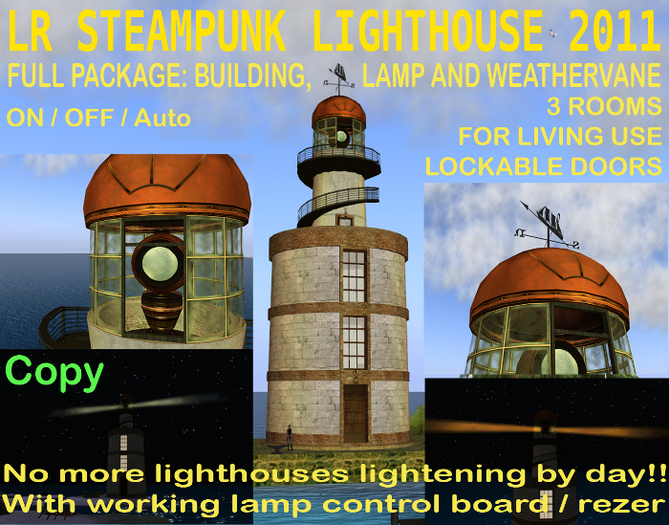


With working light and lamp control board. Menu controlled can be turned ON/OFF/AUTO and change color and rotation direction and speed. 3 colors plus white, 3 speeds (normal, double and half), normal/inverse rotation direction.
At RL lighthouse turns on at least 1 hour before sunset and turns off 1 hour after dawn, no more lighthouses lighting by day in Second Life!
AUTO: Works with REGION TIME, it will NOT work if region time is fixed. You must use then the ON/OFF switch.
OFF: rotation, lamp, light and beams: OFF (Use this setting if your region is fixed day time)
ON: rotation, lamp, light and beams: ON (Use this setting if your region is fixed night time)
AUTO: Turns on/off light smoothly on sunset and sunrise
At sunset: rotation ON, lamp ON, then beams becames full visible smoothly while darkness come
At sunrise: beams become fully invisible smoothly, then lamp OFF, rotation OFF
Transition duration: 10 min. (RL time) Smooth rotation of lamp and beams.
perms: copy
Building: 47 prims
Lamp: 7/9 prims (no axle/axle)
control board: 6 prims (optional)
Footprint:
Building 16m
Lamp 90m
beam 44m each
Height: 40m
2 separate items , lighthouse tower and lamp rezer/control board, all packed in a rezer. Place it just where you want your build to be.
At the upper tower, you will see the lamp rezer/control board. Touch it and select lamp, for saving prims you can rez the 'no axle' lamp and delete the control board after. Touch the lamp to bring up the authorization menu and the settings menu, to change light color, rotation direction and speed, and turn lighthouse lamp ON/OFF/AUTO
You can use the control board to change ON/OFF/AUTO modes. If you take the control board away, this will not affect the lamp work.
Touch the lamp rezer/control board again and rez the weathervane.
Touch the base, the windvane rez and the base aligns correctly pointing nord.
REZZING INSTRUCTIONS (IM Loco Rau if you need help)
1 - Rez the LR Steampunk Lighthouse rezzer. Put it in just where you want your build to be.
You will see the box with the ERV logo facing west. this will be the direction the door will face to. Rotate the rezzer if you want the door facing another direction.
2 - Touch it, then clic "rez" at the menu. The rezzer will rez each of the objects comprising the lighthouse, and they'll move to their appropriate positions.
3 - Move the rezzer to position your build. It may take up to 1 second for the pieces to set their new positions and rotations after moving the rezzer.
Tip: When you are placing the rezzer, at the object tab of the edit tool change the position values.
4 - Once your build is where you want it, don't forget to clean up before taking the rezzer. The child scripts will delete themselves, remove the position/rotation information from their object descriptions, and remove the " " tag from their object names.
Now come to the upper tower, open the door, you will see the lamp rezer/control board. Touch it.
Clic rez and select lamp, if you need saving prims you can rez the 'no axle' lamp and delete the control board after. Select clean up to delete scripts when done. Touch the lamp to bring up the authoritation menu to set who can adjust the lamp, and the settings menu, to change light color, rotation sense and speed, and turn lighthouse lamp ON/OFF/AUTO
You can use the control board to change ON/OFF/AUTO modes. if you take the control board away, this will not affect the lamp work.
Touch the lamp rezer/control board again and rez the weathervane. Again clean up when done.
When ready touch the base, the windvane rez and the base aligns correctly pointing nord.
If you move the base, retouch it to rez a new vane. the old vane will clean itself later / delete it
Touch East West letters, & change to:
East West
Ost West
Est Ouest / Este Oeste
as wanted.
Touch North South letters to start/stop reference particles.
The weathervane was made by ee Oh
View in World
If any question IM Loco Rau.
Loco Rau
El Rayo Verde
View all my lighthouses in World
- Working light and lamp control board
- Menu controlled can be turned ON/OFF/AUTO
- lamp changes color and rotation direction and speed
- Includes weathervane
- 3 rooms, you can live in.


