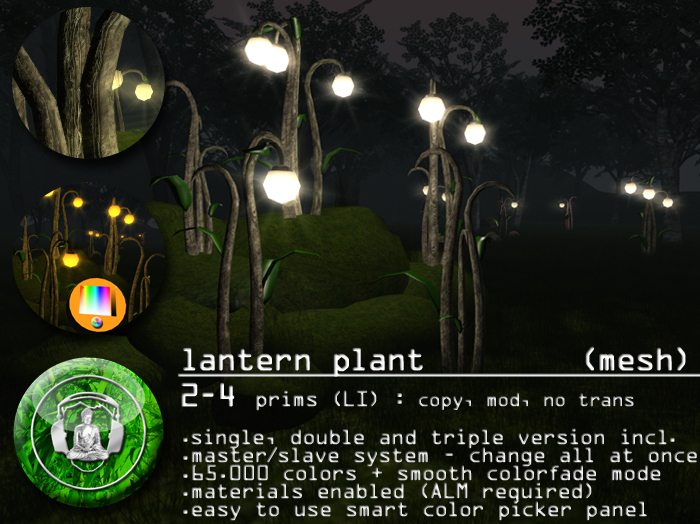

A plant? A lantern? A lantern plant!
I dug out these strange, bioluminescent plant from the deepest pitch black forests where illumination is a survival strategy to lure insects for pollination in total darkness. The light these magical plants emit makes them a decent organic lantern for your faery forest or your underground cave.
The lantern plants are made of 100% mesh, with materials textures enabled for extra depth.
The intuitive, smart color picker panel allows to change the color of the light and the glowing parts to any color you like. If you can not decide, let the plants smoothly cycle trough all colors.
The smart color picker panel is "temp rezzed" and will not count against your land prim count.
It causes minimal lag as long as it is active, but deleting it shuts the plant into an idle mode without active listeners and minimal SIM resource usage. The panel deletes itself after 30 seconds.
The other plants have an active listener on a negative channel, which is the most efficient and low lag way to transmit information from one object to another.
***FEATURES
2 - 4 prims (LI) depending on the type, copy, mod, no trans
100% mesh - materials enabled
single, double and triple versions included + bonus sprout version
65.000 colors for the glowing parts + light
7m light radius
easy to use smart color picker panel
smooth colorfade mode for the glowing parts (optional)
changing one plant switches all others
***INSTRUCTIONS
REMOTE SYSTEM
each plant is available in two different versions.
(main) and (follower).
the mein plants do have the built in controller and can easily color changed.
the follower plants are applying all changes made with the main plant.
this works region wide. (within the same SIM)
GENERAL
simply touch the main plant and a controller will appear next to it.
It can change the light color and toggle the colorfade mode.
CHANGING THE PANEL POSITION:
simply touch a plant and a controller will appear next to it.
rightclick the panel and select "edit". move the panel to a convenient position.
let the panel vanish automatically or touch the plant to make it vanish.
next time you want to change the color, the panel appears at the last position.
if you have moved the lantern plant or the panel more than 10 meters, it will
reset the position to the default position again.
NOTES
This structure features materials (specular and normal maps) on some surfaces.
You need to enable "advanced lighting model" (ALM) on your viewer preferences to see the effect.
TIP: enable ALM and deactivate shadows to have a better frame rate on older computers.
The script is set to no modify, the model is completely modifiable after you rezz it, but may appear as (no mod) in your inventory.
No plants have been harmed for the creation of this virtual object.
***QUESTIONS?
If you have any questions about this or other .:buddhabeats:. products, please IM me.
Bei fragen bezüglich diesem oder anderen .:buddhabeats:. produkten helfe ich gerne auch auf deutsch!
Namaste,
Roopert
See item in Second Life- single, double and triple versions included + bonus sprout version
- 65.000 colors for the glowing parts + light
- smooth colorfade mode for the glowing parts (optional)
- changing one plant switches all others
- easy to use smart color picker panel


